
In the era of remote and hybrid work, your webcam has become your professional handshake. It's the first impression you make in virtual meetings, the tool that conveys your credibility in client presentations, and the bridge that connects you to colleagues across the globe. Yet despite its importance, many professionals still rely on subpar built-in laptop cameras that cast them in unflattering light and grainy resolution. Let's explore what makes a great webcam for remote work and how to choose one that elevates your professional presence.
Why Your Built-In Webcam Isn't Cutting It
Most laptop webcams hover around 720p resolution with tiny sensors that struggle in anything less than perfect lighting. The result? You appear grainy, poorly lit, and sometimes slightly distorted due to the awkward angle of looking down at your laptop screen. In a world where video communication is no longer optional, this creates a subtle but real professional disadvantage.
A dedicated external webcam solves these problems with larger sensors, better optics, superior low-light performance, and the flexibility to position the camera at eye level. The difference is immediately noticeable—you'll look sharper, more professional, and more engaged in every call.
Key Features Remote Professionals Should Prioritize
Resolution: 1080p Is the Sweet Spot
While 4K webcams exist and offer stunning clarity, 1080p (Full HD) remains the practical choice for most remote workers. Here's why: most video conferencing platforms compress video significantly, and many meeting participants won't have monitors capable of displaying 4K. A quality 1080p webcam delivers excellent clarity without demanding excessive bandwidth or processing power.
Frame Rate: Smooth Motion Matters
Look for webcams that offer at least 30fps at your chosen resolution, with 60fps being ideal for smooth, natural motion. Higher frame rates eliminate the choppy, laggy appearance that can make you seem less present in conversations. If you regularly present or demonstrate products on camera, 60fps becomes particularly valuable.
Autofocus: Stay Sharp Without Thinking About It
Modern webcams feature intelligent autofocus systems that keep you crisp and clear even as you move around or lean in to emphasize a point. Premium models use advanced algorithms to maintain focus quickly and quietly, while budget options may hunt or lag. For professionals who gesture frequently or share physical documents on camera, reliable autofocus is non-negotiable.
Low-Light Performance: Looking Good in Any Setting
Not every home office has perfect lighting, and you may find yourself taking calls from hotel rooms, coffee shops, or dimly lit spaces. Webcams with larger sensors and light correction technology can compensate for challenging conditions, ensuring you look professional regardless of your environment.
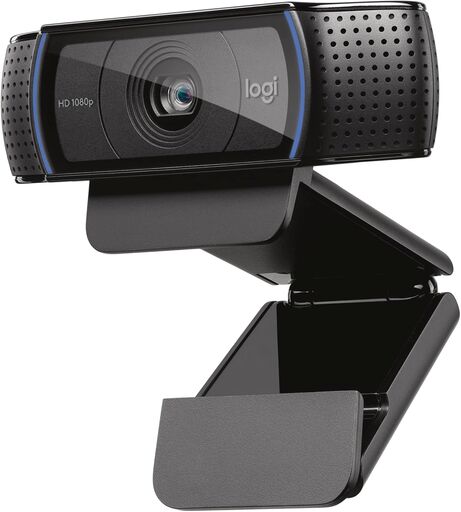
Logitech C920x HD Pro Webcam
The Professional Standard: What Most Remote Workers Need
For the majority of remote professionals, a reliable 1080p webcam with good autofocus and decent low-light performance represents the best balance of quality and value. These webcams plug in via USB, work seamlessly with all major video conferencing platforms, and deliver a noticeable upgrade over built-in alternatives.
The sweet spot typically falls in the $70-130 price range, where you'll find webcams with:
- Full HD 1080p resolution at 30fps or higher
- Stereo microphones (though a dedicated mic is still recommended)
- Automatic light correction for varying conditions
- Wide-angle lenses around 78° for a natural field of view
- Universal mounting options for monitors and tripods
When to Consider Premium Options
Certain professionals may benefit from investing in higher-end webcams:
Executives and Client-Facing Roles: If you regularly present to important clients, investors, or board members, the polish of a 4K webcam can reinforce your professional image and attention to detail.
Content Creators and Trainers: Those who record tutorials, webinars, or training materials will appreciate the flexibility and quality that premium webcams offer, especially when content may be viewed on larger screens.
Streamers and Live Presenters: If your role involves live streaming, virtual events, or frequent video content creation, features like 60fps recording and advanced color accuracy become valuable investments.
Setting Up Your Webcam for Success
Even the best webcam can't compensate for poor setup. Here are essential tips to maximize your investment:
Position at Eye Level
Mount your webcam at the top of your monitor, aligned with your eye level. This creates natural eye contact and a flattering angle. Avoid positioning below eye level, which can create an unflattering perspective.
Mind Your Lighting
Face a light source—ideally a window with natural light or a desk lamp positioned in front of you. Avoid backlighting (windows behind you) which creates silhouettes and forces your webcam to struggle with exposure.
Consider Your Background
A clean, uncluttered background projects professionalism. If your space is challenging, consider using virtual backgrounds—just ensure your webcam and computer can handle them smoothly.
Test Before Important Calls
Use your platform's video preview to check framing, lighting, and audio before crucial meetings. Most webcam software also offers settings for brightness, contrast, and color that can be fine-tuned to your environment.
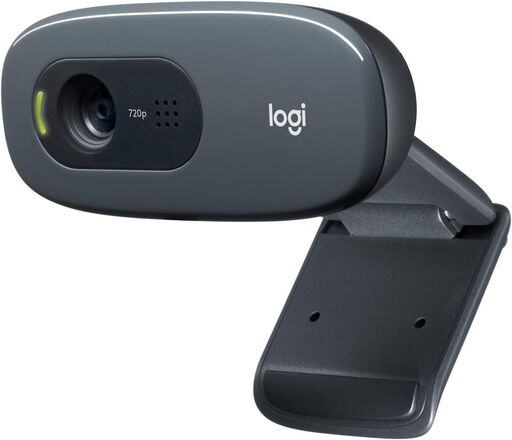
Logitech C270 HD Webcam
Budget Considerations: What Can You Expect at Each Price Point?
Under $50: Basic 720p-1080p webcams with fixed focus or slow autofocus. Suitable for occasional calls but may struggle in challenging lighting.
$50-100: Solid 1080p webcams with reliable autofocus, decent microphones, and adequate low-light performance. The sweet spot for most professionals.
$100-200: Premium 1080p or entry-level 4K webcams with advanced features like faster autofocus, superior low-light handling, and better build quality.
$200+: Professional-grade 4K webcams with exceptional image quality, advanced features like HDR, and premium construction. Best for content creators or those requiring the absolute best quality.
Final Thoughts: Investing in Your Virtual Presence
In today's remote work landscape, your webcam is a tool of professional communication as essential as your business attire once was. While you don't need to spend a fortune, investing in a quality external webcam delivers immediate, visible improvements to how colleagues, clients, and collaborators perceive you.
Consider your specific needs—frequency of video calls, lighting conditions, and professional context—and choose accordingly. For most remote professionals, a mid-range 1080p webcam offers the best return on investment, delivering professional quality without unnecessary features or expense.
Your virtual presence matters. Make sure it's represented clearly.