

If you've ever found yourself hunching over your desk, craning your neck to see your screen, or wishing you had more desk space, a monitor arm might be the single best upgrade you can make to your workspace. These deceptively simple devices do far more than just hold your monitor—they fundamentally change how you interact with your screen and can have lasting benefits for your health and productivity.
What Exactly Is a Monitor Arm?
A monitor arm is an adjustable mounting system that attaches to your desk and holds your monitor in place, replacing the standard stand that came with your display. Unlike fixed stands, monitor arms offer extensive adjustability—typically allowing you to move your screen up, down, forward, backward, and side to side with minimal effort. Most arms use either a desk clamp or a grommet (a hole drilled through your desk) to secure themselves, and they connect to your monitor via a standard VESA mount pattern.
The magic of a monitor arm lies in its articulating joints and gas spring or mechanical spring mechanisms. These allow you to position your monitor exactly where you need it and keep it there, while still being able to reposition it effortlessly when your needs change.
Why Your Neck and Back Will Thank You
The ergonomic benefits of monitor arms are substantial and well-documented. Most stock monitor stands position screens too low, forcing users to tilt their heads downward. Over time, this leads to forward head posture, neck strain, and upper back pain—issues that plague office workers worldwide.
With a monitor arm, you can position your screen at the ideal height: the top of the display should be at or slightly below eye level, with the screen tilted back approximately 10-20 degrees. This allows you to maintain a neutral neck position while viewing the center of your screen.
Beyond height adjustment, monitor arms let you control viewing distance. The general recommendation is to position your monitor about an arm's length away, but the ideal distance varies based on your vision, screen size, and resolution. A monitor arm makes it easy to find and maintain your perfect distance.
Key Features to Consider
Weight Capacity: This is perhaps the most critical specification. Monitor arms are rated to support a specific weight range, and using a monitor that's too heavy (or too light) will result in poor performance. Always check your monitor's weight before purchasing an arm.
Adjustment Range: Look for arms that offer sufficient vertical lift, extension depth, and rotation. If you ever want to share your screen with a colleague or switch between sitting and standing, you'll appreciate generous range of motion.
Build Quality and Materials: Premium arms use high-grade aluminum and steel construction with smooth, durable joints. Budget options often use plastic components that can wear out or feel less stable over time.
Cable Management: A good monitor arm includes integrated cable routing to keep your setup looking clean. This often-overlooked feature makes a significant difference in desk aesthetics.
Mounting Options: Consider whether you need a clamp mount, grommet mount, or both. Some desks (particularly those with thick edges or glass tops) may require specific mounting solutions.
Single vs. Dual Monitor Arms
If you use two monitors, you'll need to decide between two single arms or one dual arm. Dual monitor arms are generally more economical and take up less desk space since they share a single mounting point. However, they can be less flexible since moving one monitor may affect the other's position.
Two single arms cost more but offer complete independence for each monitor. This is particularly useful if you have monitors of different sizes or weights, or if you need to position them at significantly different heights or angles.
For those considering a dual setup on a budget, here's a reliable option:
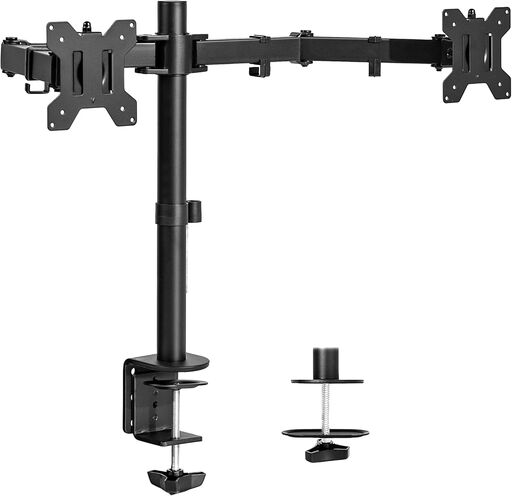
VIVO Dual Monitor Desk Mount STAND-V002
The Premium Experience
If you spend eight or more hours a day at your desk, investing in a premium monitor arm pays dividends in comfort and durability. High-end arms feature superior build quality, smoother adjustments, and often come with extended warranties. The difference is immediately noticeable—premium arms move with precision and stay exactly where you put them, year after year.
For professional users who demand the best, consider this top-tier option:
Installation Tips for Success
Installing a monitor arm is typically straightforward, but a few tips will ensure the best results:
-
Check your desk thickness: Most clamps accommodate desks between 0.5" and 2" thick. Measure before you buy.
-
Reinforce if necessary: If you have a thin or particle board desk, consider adding a support plate to distribute the clamping force and prevent damage.
-
Adjust tension first: Before mounting your monitor, adjust the arm's tension to match your monitor's weight. This is usually done via an Allen key on the arm's joints.
-
Route cables after positioning: Get your monitor positioned correctly first, then manage cables. This prevents having to redo your cable management.
-
Test the full range of motion: Make sure your monitor can move through its full range without hitting walls, shelves, or other obstacles.
Reclaiming Your Desk Space
Beyond ergonomics, monitor arms offer a practical benefit that's easy to appreciate: they free up significant desk space. A typical monitor stand has a footprint of 8-10 inches deep and wide. Remove that, and you suddenly have room for a larger mousepad, documents, or simply a cleaner, more organized workspace.
This reclaimed space is particularly valuable for those with smaller desks or anyone who appreciates minimalist aesthetics. A floating monitor creates visual openness that makes your entire workspace feel larger and more intentional.
Making Your Decision
When choosing a monitor arm, start by identifying your must-haves:
-
Budget-conscious users should look for arms with solid reviews and adequate specifications for their monitor weight. You don't need every premium feature to enjoy the core benefits.
-
Ergonomics-focused users should prioritize smooth adjustability and full range of motion, especially if you switch between sitting and standing.
-
Aesthetic-focused users should consider premium arms with superior build quality and clean cable management.
-
Multi-monitor users need to carefully consider their desk setup, monitor weights, and whether independent positioning matters.
Regardless of which category you fall into, almost any quality monitor arm will be an upgrade over a stock stand. The improvements to posture, comfort, and desk organization make monitor arms one of the highest-impact workspace investments you can make.
Final Thoughts
A monitor arm might seem like a simple accessory, but its impact on daily comfort and workspace functionality is profound. By allowing you to position your screen at the perfect height, distance, and angle, you're not just organizing your desk—you're investing in your long-term health and productivity.
Whether you opt for a budget-friendly option or a premium arm with all the bells and whistles, the key is finding one that matches your monitor's specifications and your adjustment needs. Your neck, back, and newly spacious desk will thank you.